Core Web Vitals Explained: Improve Website Speed and SEO
Introduction
Website performance has become one of the most important factors in modern SEO. While creating valuable content and building backlinks remain essential, Google also evaluates how users experience your website. A slow-loading page, unresponsive buttons, or unexpected layout shifts can frustrate visitors and negatively affect search performance.
This is where Core Web Vitals play a crucial role.
Core Web Vitals are a set of performance metrics introduced by Google to measure real-world user experience. They focus on how quickly a page loads, how responsive it feels, and how visually stable it remains while users interact with it. These metrics help website owners identify performance issues that impact both visitors and search rankings.
From my experience working with SEO and website optimization, many businesses concentrate on publishing content but overlook technical performance. Even well-written articles may struggle to perform if users leave because the website is slow or difficult to use. Improving Core Web Vitals creates a better browsing experience while strengthening the technical foundation of your SEO strategy.
This guide explains what Core Web Vitals are, why they matter, how Google measures them, and the practical steps you can take to improve your website’s performance.
What Are Core Web Vitals?
Core Web Vitals are Google’s primary metrics for measuring page experience. They evaluate how users perceive the speed, responsiveness, and stability of a webpage during real-world browsing.
Unlike general performance scores, these metrics are based on actual user interactions collected through Chrome browsers. This means Google measures how visitors experience your website instead of relying only on laboratory testing.
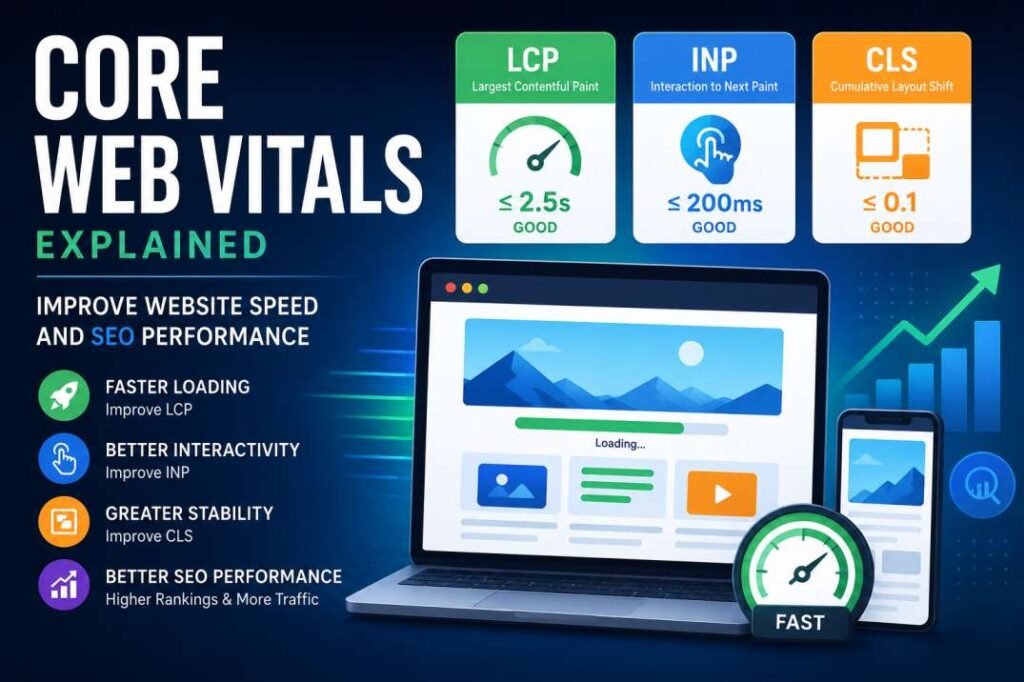
The three Core Web Vitals are:
- Largest Contentful Paint (LCP)
- Interaction to Next Paint (INP)
- Cumulative Layout Shift (CLS)
Together, these metrics provide a comprehensive view of website performance.
A website that performs well in all three areas is more likely to deliver a smooth user experience and support stronger SEO performance.
Why Core Web Vitals Matter for SEO
Google aims to provide users with the best possible search experience. High-quality content remains the foundation of SEO, but user experience has become an important ranking consideration.
Core Web Vitals help Google understand whether visitors can interact with your website efficiently.
Improving these metrics offers several benefits:
- Faster loading pages
- Better user experience
- Lower bounce rates
- Increased visitor engagement
- Higher conversion potential
- Improved mobile usability
- Better search visibility
- Greater visitor satisfaction
Although Core Web Vitals are only one part of Google’s ranking system, websites with strong performance often provide a better experience that encourages users to stay longer and explore more pages.
Understanding the Three Core Web Vitals
Each metric measures a different aspect of user experience.
Understanding them individually makes it easier to identify performance issues and prioritize improvements.
Largest Contentful Paint (LCP)
Largest Contentful Paint measures loading performance.
It records how long it takes for the largest visible content element on a page to appear within the user’s browser. This element is often a large image, heading, banner, or featured content section.
A fast LCP reassures visitors that the page is loading correctly.
Google recommends:
- Good: 2.5 seconds or less
- Needs Improvement: 2.5 to 4 seconds
- Poor: More than 4 seconds
Common causes of poor LCP include:
- Large uncompressed images
- Slow hosting
- Render-blocking CSS
- Heavy JavaScript
- Slow server response time
Improving LCP usually begins with optimizing images, reducing unnecessary code, and selecting reliable hosting.
Interaction to Next Paint (INP)
Interaction to Next Paint measures responsiveness.
It evaluates how quickly a webpage responds after a visitor clicks a button, taps a menu, submits a form, or performs another interaction.
A responsive website feels smooth and immediate.
Google introduced INP to replace the older First Input Delay (FID) metric because it provides a more complete picture of responsiveness throughout the user’s visit.
Google recommends:
- Good: 200 milliseconds or less
- Needs Improvement: 200 to 500 milliseconds
- Poor: More than 500 milliseconds
Common reasons for poor INP include:
- Heavy JavaScript execution
- Large third-party scripts
- Long-running browser tasks
- Poor frontend optimization
Reducing unnecessary JavaScript and improving browser efficiency are among the most effective ways to improve responsiveness.
Cumulative Layout Shift (CLS)
Cumulative Layout Shift measures visual stability.
Have you ever tried clicking a button only for the page to suddenly move, causing you to click something else instead?
That is exactly what CLS measures.
Unexpected movement often occurs when images, advertisements, fonts, or embedded content load after the page begins rendering.
Google recommends:
- Good: 0.1 or less
- Needs Improvement: 0.1 to 0.25
- Poor: More than 0.25
Common causes include:
- Images without dimensions
- Ads loading late
- Dynamically inserted content
- Unoptimized fonts
- Embedded videos without reserved space
Maintaining visual stability improves user trust and creates a more professional browsing experience.
Core Web Vitals at a Glance
| Metric | Measures | Good Score | Common Problems |
|---|---|---|---|
| Largest Contentful Paint (LCP) | Loading performance | ≤ 2.5 seconds | Large images, slow hosting, render-blocking resources |
| Interaction to Next Paint (INP) | Responsiveness | ≤ 200 ms | Heavy JavaScript, third-party scripts |
| Cumulative Layout Shift (CLS) | Visual stability | ≤ 0.1 | Images without dimensions, shifting content |
How Google Measures Core Web Vitals
Google collects Core Web Vitals data from real users through the Chrome User Experience Report (CrUX). This field data reflects actual browsing conditions, including different devices, network speeds, and user interactions.
Google also provides laboratory testing tools that simulate performance under controlled conditions. While lab data is useful for identifying issues during development, real-user data has a greater influence on how Google evaluates page experience.
Several tools can help you monitor Core Web Vitals, including:
- Google PageSpeed Insights
- Google Search Console
- Lighthouse
- Chrome DevTools
- Chrome User Experience Report
Regularly reviewing these tools allows you to identify problems before they affect your visitors or search performance.
Why Website Owners Should Monitor Core Web Vitals
Monitoring performance should not be a one-time task. Every website update, plugin installation, theme modification, or content addition can influence loading speed and responsiveness.
By tracking Core Web Vitals regularly, website owners can:
- Detect performance issues early.
- Improve user satisfaction.
- Reduce page abandonment.
- Support long-term SEO growth.
- Maintain a competitive website experience.
Consistent monitoring helps ensure your website continues to meet Google’s performance expectations while delivering a smooth browsing experience for users.
How to Improve Largest Contentful Paint (LCP)
Improving LCP starts with identifying what delays the largest visible element on your page. In most cases, this is a large image, hero banner, or heading that appears at the top of the page.
One of the simplest improvements is optimizing images. Modern formats like WebP provide excellent quality while significantly reducing file size. Compressing images before uploading them also reduces loading time without noticeably affecting visual quality.
Choosing reliable hosting is equally important. A fast server response time helps browsers begin loading content sooner. If your website receives significant traffic, upgrading to better hosting or using a Content Delivery Network (CDN) can noticeably improve performance.
Other effective ways to improve LCP include:
- Compress images before uploading.
- Use WebP image format.
- Enable browser caching.
- Minify CSS and JavaScript.
- Remove unused CSS.
- Reduce render-blocking resources.
- Use a Content Delivery Network (CDN).
- Improve server response time.
Regular testing with PageSpeed Insights helps measure the impact of these improvements.
How to Improve Interaction to Next Paint (INP)
A responsive website creates a better experience for visitors by reacting quickly to user interactions.
Large JavaScript files are one of the biggest causes of poor responsiveness. Every unnecessary script increases the amount of work browsers must complete before responding to user actions.
Website owners should regularly review installed plugins and remove features that are no longer needed. Third-party scripts, including chat widgets, tracking tools, and advertising scripts, should also be evaluated because they often delay interaction.
Practical ways to improve INP include:
- Reduce JavaScript execution time.
- Remove unused plugins.
- Delay non-essential scripts.
- Optimize third-party code.
- Split large JavaScript files.
- Keep page layouts lightweight.
- Update themes and plugins regularly.
Improving responsiveness not only supports SEO but also increases user satisfaction and engagement.
How to Improve Cumulative Layout Shift (CLS)
Unexpected movement while a page loads creates a frustrating user experience.
Fortunately, CLS is often one of the easiest Core Web Vitals metrics to improve.
Always specify image dimensions so browsers know how much space to reserve before the image loads.
Reserve fixed areas for advertisements and embedded content.
Avoid inserting banners or popups above existing content after the page begins loading.
Use optimized fonts that load efficiently and minimize layout changes.
Simple improvements include:
- Specify image width and height.
- Reserve space for advertisements.
- Avoid inserting content above existing elements.
- Optimize web fonts.
- Keep page layouts consistent.
A visually stable page feels more professional and improves visitor confidence.
Common Tools to Measure Core Web Vitals
Several free tools help monitor website performance.
| Tool | Primary Purpose |
|---|---|
| Google PageSpeed Insights | Measures real-world and lab performance |
| Google Search Console | Reports Core Web Vitals issues across your website |
| Lighthouse | Provides detailed performance audits |
| Chrome DevTools | Helps identify performance bottlenecks |
| GTmetrix | Analyzes loading speed and optimization opportunities |
Using more than one tool provides a more complete understanding of your website’s performance.
Common Core Web Vitals Mistakes
Many websites fail Core Web Vitals because of avoidable technical issues.
Some of the most common mistakes include:
- Uploading oversized images.
- Installing too many plugins.
- Ignoring browser caching.
- Using slow web hosting.
- Loading unnecessary JavaScript.
- Using poorly optimized themes.
- Embedding multiple third-party widgets.
- Failing to test after website updates.
Regular performance audits help identify these problems before they affect visitors.
Core Web Vitals and Technical SEO
Website performance is one of the strongest foundations of Technical SEO.
Search engines need to crawl websites efficiently, but users also expect pages to load quickly and respond instantly.
Optimizing Core Web Vitals improves both technical performance and user experience.
A technically optimized website typically includes:
- Fast page loading.
- Responsive mobile design.
- Secure HTTPS connection.
- Clean website architecture.
- Optimized images.
- Efficient code.
- Proper caching.
- Internal linking.
Another important element of Technical SEO is Schema Markup for SEO, which helps search engines understand the meaning and context of your content. While Core Web Vitals improve website performance and user experience, Schema Markup for SEO improves how search engines and AI systems interpret your pages. Together, they create a stronger technical foundation for higher search visibility.
Performance optimization should always be considered an essential part of your Technical SEO strategy rather than a separate task.
Optimizing performance should be included in every Technical SEO Checklist because it improves both user experience and search visibility.
Core Web Vitals and AI Search
Artificial intelligence is transforming how users discover information online.
Modern AI-powered search systems evaluate websites that provide reliable information while delivering an excellent user experience.
Fast websites make it easier for AI systems to access, process, and understand content efficiently.
Although Core Web Vitals are not direct signals used by every AI platform, strong website performance contributes to better content accessibility and overall quality.
Businesses investing in performance optimization are building a stronger foundation for future AI-driven search experiences.
Improving website performance also supports AI Search Optimization by making content easier for AI systems to access and understand. It also contributes to Generative Engine Optimization, helping AI-powered platforms process content more efficiently.
Best Practices for Maintaining Core Web Vitals
Improving performance is not a one-time project.
Every website update has the potential to affect loading speed and user experience.
To maintain healthy Core Web Vitals:
- Monitor performance every month.
- Compress all new images.
- Test plugins before installing.
- Update themes regularly.
- Review PageSpeed Insights after major changes.
- Minify CSS and JavaScript.
- Remove unused code.
- Optimize fonts.
- Use lazy loading where appropriate.
- Keep website hosting updated.
Consistent maintenance helps preserve performance over time.
Core Web Vitals, User Experience, and E-E-A-T
Google’s E-E-A-T framework emphasizes creating trustworthy, helpful, and user-focused content.
While E-E-A-T primarily relates to content quality and credibility, website performance directly influences how users experience that content.
Visitors are more likely to trust a fast, responsive website than one that loads slowly or behaves unpredictably.
Improving Core Web Vitals supports the overall quality of your website by creating a smoother browsing experience.
Combined with valuable content and technical optimization, performance improvements strengthen your long-term SEO strategy.
Conclusion
Core Web Vitals have become an essential part of modern SEO because they measure how real users experience your website.
Fast loading pages, responsive interactions, and stable layouts improve user satisfaction while supporting stronger search performance.
Although content quality remains the most important element of SEO, technical performance ensures users can access and engage with that content effectively.
By monitoring Core Web Vitals regularly, optimizing images and code, improving hosting, and maintaining a technically healthy website, businesses can create a better experience for visitors and strengthen their long-term organic visibility.
Investing in website performance today helps prepare your website for both traditional search engines and the future of AI-powered search.
Frequently Asked Questions
What are Core Web Vitals?
Core Web Vitals are Google’s performance metrics that measure loading speed, responsiveness, and visual stability to evaluate user experience.
Do Core Web Vitals affect SEO?
Yes. While they are only one of many ranking factors, Core Web Vitals contribute to page experience, which can influence search performance.
What is a good LCP score?
Google recommends a Largest Contentful Paint score of 2.5 seconds or less.
How often should I test Core Web Vitals?
It is recommended to review your website’s performance at least once a month and after significant website updates.
Which tool is best for checking Core Web Vitals?
Google PageSpeed Insights is one of the most widely used tools because it combines real-user data with performance recommendations.